


Best Budget Laptop for Programming in Bangladesh: Complete Guide for CS Students & Developers
Shopping for your first programming laptop in Bangladesh can feel overwhelming. Between juggling processor specs, RAM configurations, and tight student budgets, finding the sweet spot isn’t easy. However, you don’t need a ৳150,000 machine to write clean code or build impressive projects.
Whether you’re a computer science student debugging your first algorithm or a junior developer building full-stack applications, this guide breaks down exactly what you need—and what you can skip—when choosing an affordable programming laptop in the Bangladeshi market.
Why Programming Demands Different Laptop Specs
Your laptop isn’t just a typing machine when you’re coding. It becomes your entire development ecosystem, simultaneously running resource-hungry IDEs like Visual Studio Code or IntelliJ IDEA, compiling code, executing test suites, running local servers, and maintaining dozens of browser tabs with documentation.
Understanding Your Development Environment
Modern development workflows are surprisingly demanding. Picture this: you’ve got Visual Studio Code open with multiple extensions, a Node.js server running locally, Docker containers for database testing, Chrome with 15 Stack Overflow tabs, and Spotify playing in the background. That’s a typical Tuesday afternoon for most developers.
Unlike casual browsing or document editing, programming pushes your system consistently. When your compiler takes 30 seconds instead of 5 to build your project, those delays compound throughout your day, affecting both productivity and learning momentum.
Real-World Performance Requirements
The programming landscape has evolved significantly. Even entry-level development now involves tools that would have been considered “advanced” just five years ago. If you’re learning web development, you’re working with bundlers like Webpack, transpilers like Babel, and frameworks like React or Vue. Each adds processing overhead.
For students diving into Android development, the Android Studio emulator alone can consume 4GB of RAM. Machine learning enthusiasts working with TensorFlow or PyTorch need even more computational headroom. Understanding these real-world demands helps you choose wisely rather than buying based solely on price tags.
Essential Specifications for Programming Laptops
Let’s decode the technical jargon and focus on what actually matters for your coding journey.
Processor: The Brain of Your Development Machine
Your processor determines how fast your code compiles, how smoothly your development tools run, and whether you’ll be productive or perpetually frustrated. For budget programming laptops in Bangladesh, aim for at least an Intel Core i5 11th generation or AMD Ryzen 5 5000 series.
These processors handle multiple threads efficiently, which is exactly what happens when your IDE syntax-checks your code while you’re actively typing, or when running automated tests in the background. Avoid Intel Celeron or Pentium processors—they’ll create bottlenecks that slow your learning curve.
The sweet spot for Bangladesh’s budget market is the Intel Core i5 13th generation, offering excellent performance per taka spent. You’ll find these in the ৳55,000-৳70,000 range, delivering processing power that remains relevant for your entire undergraduate journey.
RAM: Multitasking Made Easy
Here’s the truth about RAM for programming: 8GB is the absolute minimum, but 16GB is what you really want if your budget stretches that far. When you’re running your code editor, a local server, database instance, and web browser simultaneously, RAM becomes your bottleneck before the processor does.
Many Lenovo laptops for students in Bangladesh now offer 8GB configurations under ৳60,000, which handles most undergraduate programming workloads comfortably. If you’re planning to work with Android Studio, Docker, or virtual machines regularly, consider models with 12GB or 16GB to future-proof your setup.
RAM isn’t just about running programs—it’s about running them smoothly. When your system runs out of RAM, it starts using your storage as “virtual memory,” which is dramatically slower. That’s when you notice your entire laptop becoming sluggish, not just the application you’re using.
Storage: Why SSD is Non-Negotiable
Solid State Drives (SSDs) represent the single most impactful upgrade for programming laptops. The difference between an SSD and traditional hard drive affects everything: boot times, application launch speed, project loading, code compilation, and overall system responsiveness.
A 256GB SSD provides enough space for your operating system, development tools (Visual Studio Code, Git, Node.js, Python, Docker), and several active projects. For serious development work, 512GB is ideal, especially if you work with large datasets or multiple virtual machine images.
When browsing HP laptops in Bangladesh, prioritize SSD storage over larger HDD capacity. A 256GB SSD outperforms a 1TB HDD for development work every single time. Your compiler will thank you, and so will your patience.
Display Quality for Extended Coding Sessions
You’ll spend hours staring at your screen, reading tiny text, and distinguishing syntax highlighting colors. A quality display isn’t luxury—it’s necessity. Target Full HD resolution (1920×1080) as your minimum standard. Lower resolutions make code harder to read and limit how much information you can see simultaneously.
Screen size matters too. The 15.6-inch displays found in most budget laptops offer an excellent balance between portability and workspace. You can comfortably split your screen between code and documentation, or view multiple files side-by-side.
IPS panels provide better viewing angles than TN panels, reducing eye strain during long study sessions. While ASUS Zenbook models offer stunning OLED displays, budget-friendly IPS panels in the ৳50,000-৳70,000 range work perfectly well for coding.
Top 7 Budget Laptops for Programming in Bangladesh (Under ৳70,000)
Based on current market availability and real-world programming performance, here are the best options for Bangladesh’s aspiring developers.
1. Lenovo IdeaPad Slim 3 (Best Overall)
Price Range: ৳58,000 – ৳65,000
Key Specs: Intel Core i5 13th Gen | 8GB RAM | 512GB SSD | 15.6″ FHD
The Lenovo IdeaPad Slim 3 consistently earns top recommendations for student programmers. Its 13th generation Intel processor handles compilation tasks smoothly, while the 512GB SSD provides ample space for your development environment and projects.
Best For: Web development, Python programming, general software engineering coursework
Ideal User: Computer science undergraduates who need reliable all-around performance
The keyboard offers comfortable typing for extended coding sessions, and the laptop remains relatively lightweight at around 1.65kg, making it practical for daily university commutes.

2. ASUS Vivobook 15 (Best Display)
Price Range: ৳55,000 – ৳68,000
Key Specs: AMD Ryzen 5 7000 Series | 8GB RAM | 512GB SSD | 15.6″ FHD IPS
If display quality ranks high on your priority list, the ASUS Vivobook 15 delivers impressive color accuracy and viewing angles. Its IPS panel reduces eye strain during marathon coding sessions, while AMD’s Ryzen 5 processor offers strong multi-threaded performance for compilation tasks.
Best For: Frontend developers, students working with design tools, mobile app development
Ideal User: Developers who value screen quality and frequently reference visual mockups
ASUS’s build quality shines in this price segment, with a chassis that feels more premium than its price tag suggests.
3. HP 255 G10 (Most Affordable)
Price Range: ৳48,000 – ৳55,000
Key Specs: AMD Ryzen 3 | 8GB RAM | 256GB SSD | 15.6″ FHD
For students on extremely tight budgets, the HP 255 G10 represents the absolute baseline for comfortable programming. While it won’t win speed contests, it handles HTML, CSS, JavaScript development, and basic Python programming adequately.
Best For: Beginners learning their first programming language, students focused primarily on web technologies
Ideal User: First-year students who need functional performance at minimum cost
The 256GB SSD keeps the system responsive, though you’ll need external storage for larger projects and media files.

4. Acer Aspire 3 (Best Battery Life)
Price Range: ৳52,000 – ৳62,000
Key Specs: Intel Core i3/i5 12th Gen | 8GB RAM | 512GB SSD | 15.6″ FHD
The Acer Aspire 3 prioritizes endurance, with battery life reaching 7-8 hours under typical development workloads. For students who spend full days on campus without reliable charging access, this longevity proves invaluable.
Best For: Students with long campus days, remote learners, freelance developers
Ideal User: Mobile developers who need all-day unplugged productivity
Acer’s thermal management keeps the laptop cool even during intensive compilation tasks, preventing the performance throttling common in cheaper machines.
5. Lenovo V15 G4 (Best for Multitasking)
Price Range: ৳62,000 – ৳68,000
Key Specs: Intel Core i5 13th Gen | 8GB RAM | 512GB SSD | 15.6″ FHD
Designed specifically for business users and developers, the Lenovo V15 handles multiple applications running simultaneously with ease. Its professional-grade build quality suggests durability beyond typical student laptops.
Best For: Developers running multiple virtual machines, database developers, backend engineers
Ideal User: Junior developers working on complex multi-tier applications
The V15’s efficient cooling system maintains consistent performance even under sustained loads, making it reliable for long debugging sessions.
6. Acer Nitro V15 (Best for Game Development)
Price Range: ৳68,000 – ৳75,000
Key Specs: Intel Core i5/Ryzen 5 | 8GB RAM | 512GB SSD | GTX/RTX Graphics
For students interested in game development, machine learning, or graphics programming, the Acer Nitro V15 includes dedicated graphics—a rare feature in this price bracket. Its discrete GPU accelerates rendering, simulations, and GPU-accelerated computing tasks.
Best For: Unity/Unreal Engine developers, machine learning students, graphics programming
Ideal User: Developers whose work involves 3D rendering or GPU computation
While slightly above our strict budget limit, the gaming-focused hardware proves worthwhile if your programming involves visual computing.
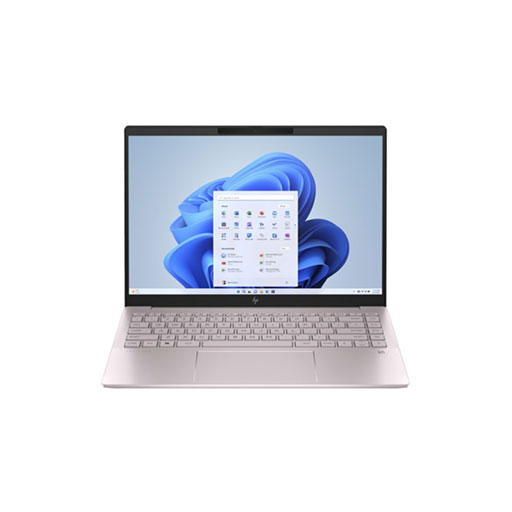
HP Pavilion Plus 14 Ultrabook
7. HP Pavilion 15 (Premium Budget Option)
Price Range: ৳65,000 – ৳72,000
Key Specs: Intel Core i5 12th Gen | 8GB RAM | 512GB SSD | 15.6″ FHD
The HP Pavilion 15 straddles the line between budget and mid-range laptops. Its premium build quality, excellent keyboard, and reliable performance make it a solid choice for serious students who can stretch their budget slightly.
Best For: Full-stack developers, students pursuing programming professionally, freelance developers
Ideal User: Dedicated CS students planning software engineering careers
HP’s extensive service network across Bangladesh provides peace of mind for warranty and repair needs.
Where to Buy Programming Laptops in Bangladesh
ByteCity offers one of Bangladesh’s most comprehensive selections of student laptops, with transparent pricing and genuine warranty coverage. Their website allows easy comparison between models, and their customer service team can guide you based on your specific programming needs.
For those seeking the absolute best laptop deals, watch for seasonal sales during university admission periods or year-end clearances. Many retailers offer EMI options, making higher-spec models more accessible to students.
Visit ByteCity’s gaming laptop section if you need dedicated graphics for game development or machine learning projects. While marketed for gaming, these machines excel at GPU-intensive programming tasks.
❓ FAQ: Programming Laptops in Bangladesh
Q1: Is 8GB RAM enough for programming in 2025?
Yes, 8GB RAM handles most undergraduate programming tasks comfortably, including web development, Python, Java, and C++ coursework. However, Android development, Docker usage, or running multiple virtual machines benefits significantly from 16GB. If your budget allows, choose 16GB for future-proofing.
Q2: Should I choose Intel or AMD processors for programming?
Both Intel Core i5 and AMD Ryzen 5 processors perform excellently for programming. Intel traditionally offers slightly better single-thread performance, while AMD Ryzen provides better value with superior multi-thread capabilities. For most programming tasks, the difference is negligible—choose based on overall laptop value and availability in Bangladesh.
Q3: Can I upgrade RAM later in budget laptops?
Many laptops in the ৳50,000-৳70,000 range offer upgradeable RAM, but check specific models before purchasing. Lenovo IdeaPad and HP Pavilion series typically allow RAM upgrades, while some ultrabook designs use soldered RAM. Confirm upgrade possibilities with retailers before buying.
Q4: Do I need dedicated graphics for programming?
Integrated graphics suffice for 90% of programming work, including web development, backend systems, and mobile apps. Dedicated graphics become necessary only for game development (Unity/Unreal), machine learning model training, graphics programming, or 3D visualization work.
Q5: Which laptop brand offers best after-sales service in Bangladesh?
HP and Lenovo maintain extensive service networks across Bangladesh, making warranty claims and repairs more convenient. ASUS and Acer also provide reliable support in major cities. Check service center locations near your university before purchasing.
Q6: How long should a programming laptop last?
A well-chosen laptop with i5 processor, 8GB RAM, and SSD should serve you comfortably through a 4-year undergraduate degree. Proper maintenance—keeping it clean, avoiding overheating, and updating software regularly—extends lifespan significantly.